

توضیحات
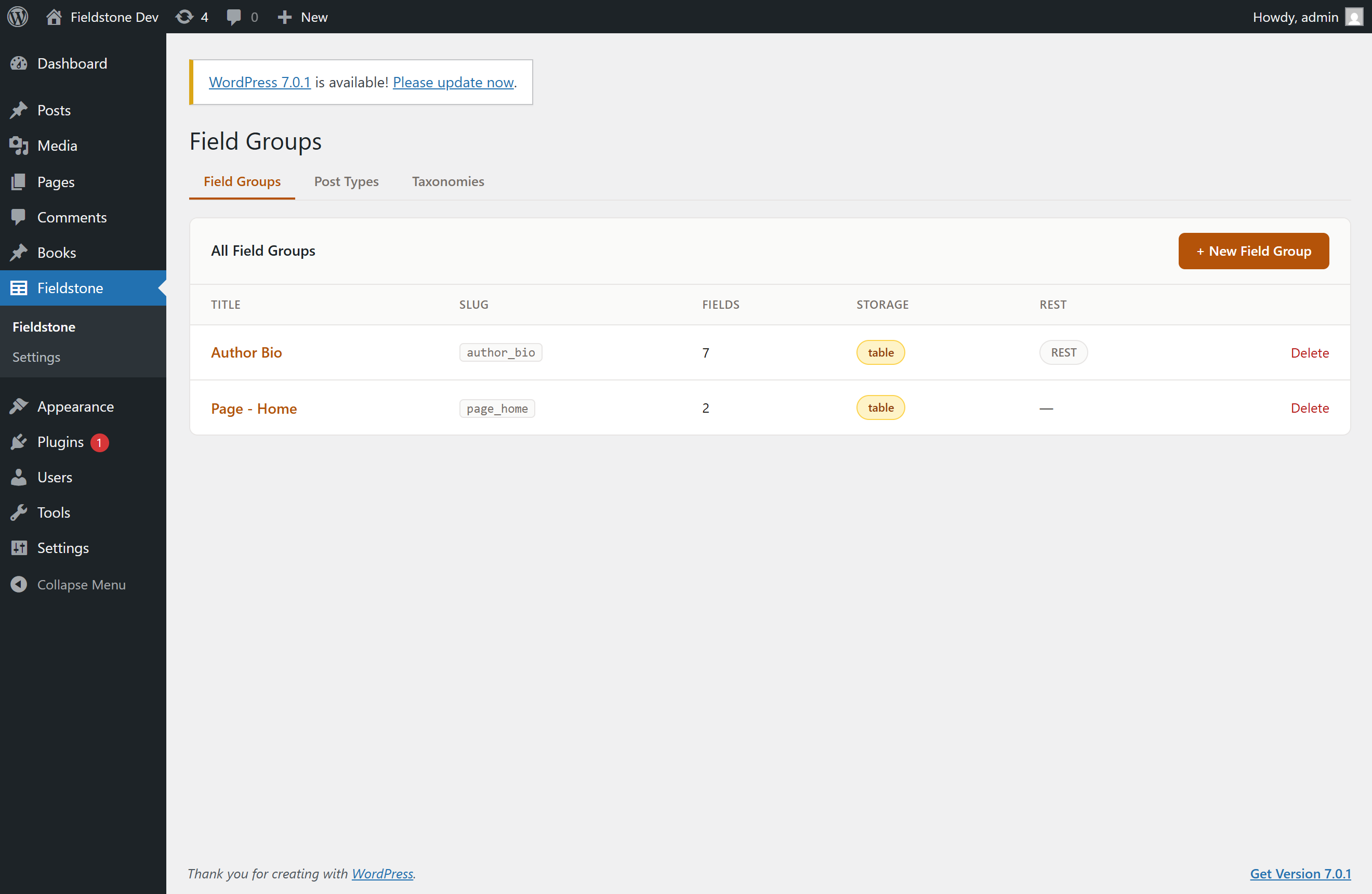
Fieldstone is a content-modeling plugin for WordPress: build field groups, custom post types, and taxonomies from a clean visual editor, then read the values in your theme with simple template functions.
What makes Fieldstone different is where your data lives. Field values are stored in dedicated, indexed database tables — one row per post — instead of scattering two rows per field across wp_postmeta. That means faster queries, no postmeta bloat, and content you can actually query by field value.
At the same time, a postmeta mirror (on by default) keeps a plain copy of every value where the rest of the ecosystem expects it, so exports, backups, SEO plugins, and search plugins keep working untouched.
Features
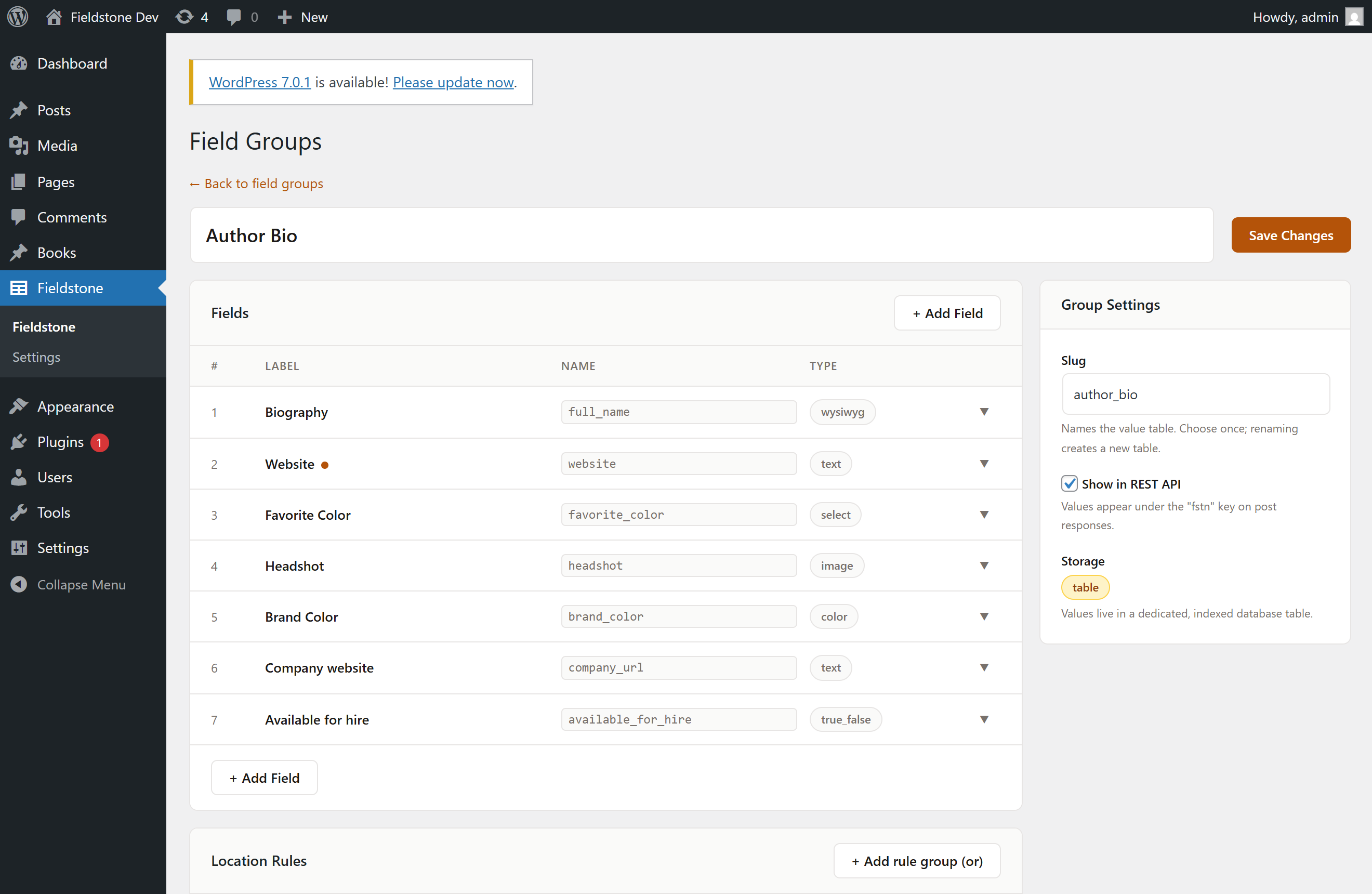
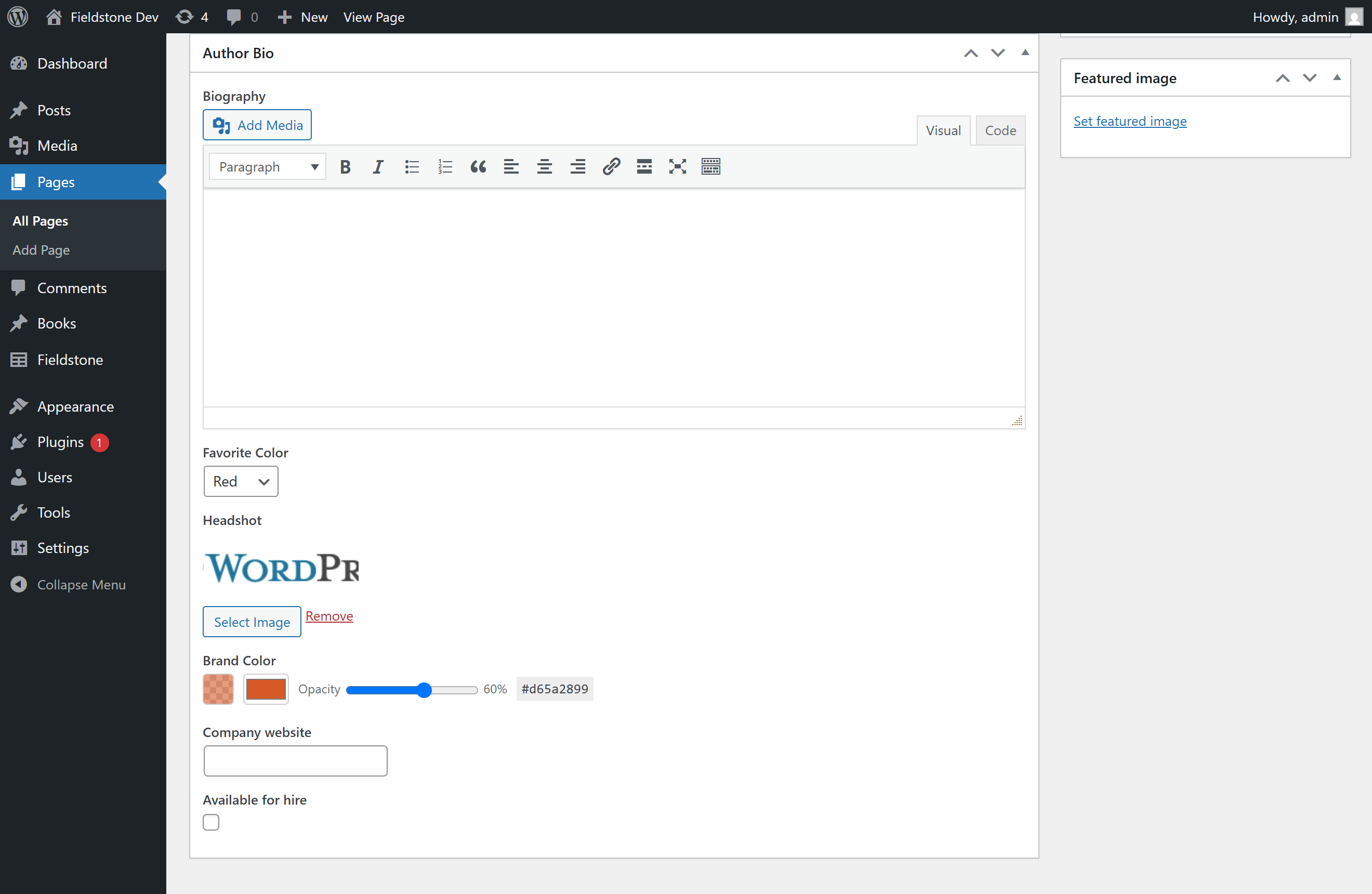
- Visual field group editor — 15 field types: text, textarea, number, email, URL, select, checkbox, radio, true/false, image, file, WYSIWYG, date, color, and post link.
- Custom table storage — one indexed row per post; opt any field into a real database index.
- Postmeta mirror — full compatibility with WordPress export/import, backup plugins, SEO variables, and search plugins. A rebuild tool covers both directions.
- Location rules — target field groups by post type, page template, specific post/page, page type (front page, child pages…), or post status, combined with and/or logic.
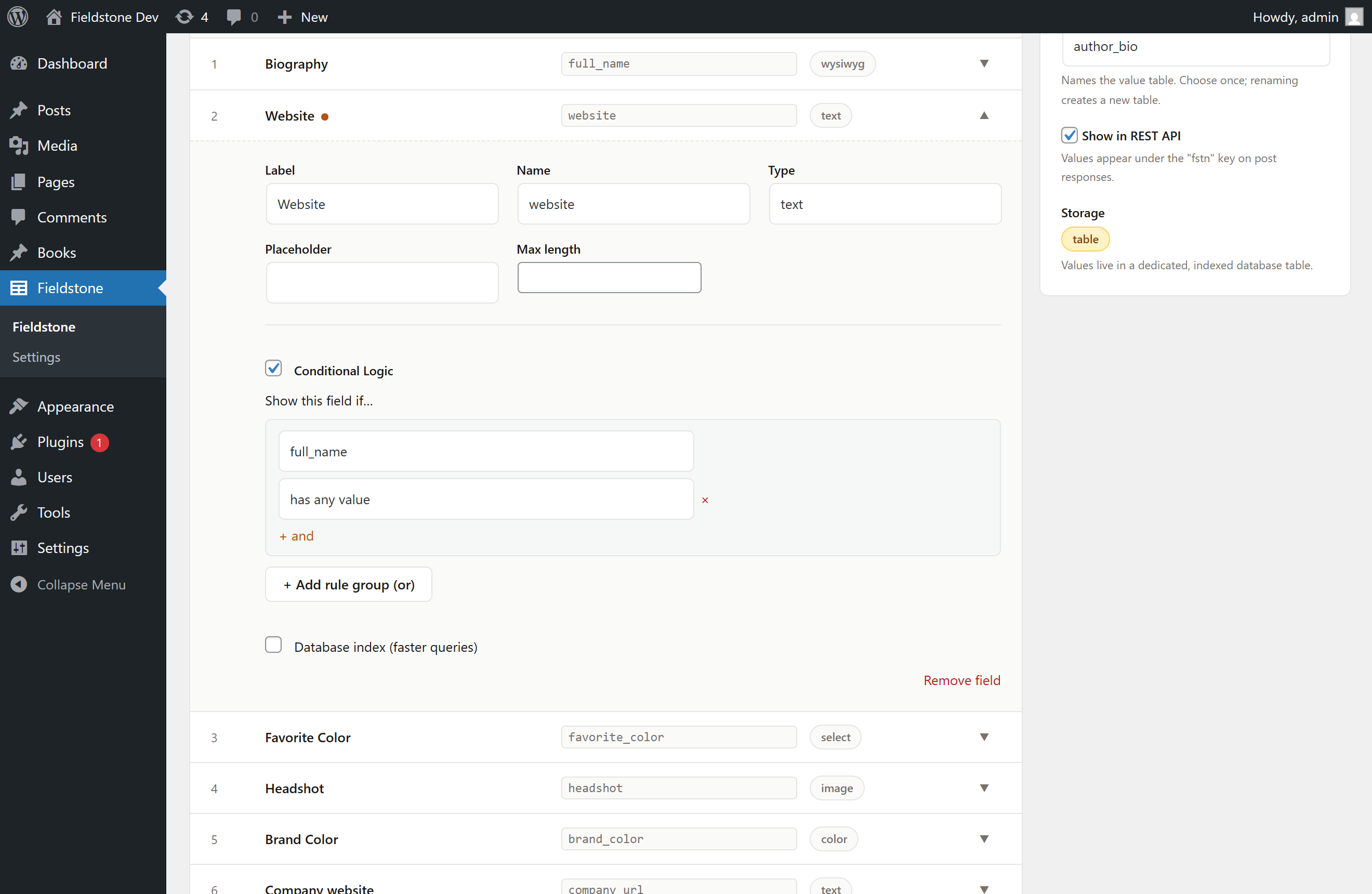
- Conditional logic — show or hide fields based on other fields’ values, enforced server-side.
- Validation — mark any field required, and set length, range, pattern or format rules with your own error message. Checked in the browser before saving and re-checked on the server, where an invalid field is reported without overwriting the value you already had.
- Import from Advanced Custom Fields — bring your existing ACF field groups across in one click, with a plain-English warning for anything that can’t map one to one. Deterministic mapping, no AI involved, and your ACF data is left untouched.
- Custom post types & taxonomies — register them from the same editor, with labels generated for you.
- Local JSON — every definition (field groups, post types, taxonomies) syncs to files in your theme for version control and deployments.
- REST API — opt field groups into the REST API; values appear on post responses and are writable with proper permissions.
- WP-CLI —
wp fstn json status|sync,wp fstn mirror rebuild,wp fstn table status. - Developer API —
fstn_get_field(),fstn_the_field()(escaped by default),fstn_update_field(),fstn_register_field_group(), and a stable extension contract for custom field types. - Generate with AI (optional) — describe a field group in plain language (“a recipe with ingredients, prep time and a photo”) and get the whole group drafted for review: correct types, choices, validation rules, and a location rule. Or open a group you have already started and ask for the fields it is missing — suggestions are added for review and never rename or replace what you built. Bring-your-own Anthropic API key; completely off until you add one. See “External services” below.
How to use
- Go to Fieldstone New Field Group, add your fields, and set a location rule (e.g. Post Type is Page).
- Edit a matching post — your fields appear in a metabox. Fill them in and update.
- Display the values in your theme with the template functions below.
Template functions
fstn_get_field( $name, $context, $format )— returns a field value (formatted by default). You escape the output.fstn_the_field( $name, $context )— echoes the value already escaped withesc_html(). Best for plain text.fstn_get_fields( $context )— returns all values for an object as aname => valuearray.fstn_update_field( $name, $value, $context )— sanitizes and stores a value.-
fstn_delete_field( $name, $context )— deletes a value.$context defaults to the current post in The Loop. It also accepts a post ID (
123),'option'for site-wide values,'user_5'for a user,'term_12'for a term, or aWP_Post/WP_User/WP_Termobject.
Displaying each field type
Text / Textarea / Email — returns a string ('' when empty).
<p><?php fstn_the_field( 'headline' ); ?></p>
URL — returns an escaped URL string.
<a href="<?php echo esc_url( fstn_get_field( 'website' ) ); ?>">Visit</a>
Number — returns an int (or float when decimals are enabled), null when empty.
<?php $price = fstn_get_field( 'price' ); ?>
<span>$<?php echo esc_html( number_format( $price, 2 ) ); ?></span>
True / False — returns a bool.
<?php if ( fstn_get_field( 'is_featured' ) ) : ?><span class="badge">Featured</span><?php endif; ?>
Select / Radio — returns the chosen value as a string. A select with “Allow multiple” returns an array of strings.
<?php foreach ( (array) fstn_get_field( 'tags' ) as $tag ) : ?>
    <li><?php echo esc_html( $tag ); ?></li>
<?php endforeach; ?>
Checkbox — returns an array of the checked values.
<?php foreach ( fstn_get_field( 'features' ) as $feature ) : ?>
    <li><?php echo esc_html( $feature ); ?></li>
<?php endforeach; ?>
Image — return format is a per-field setting: array (default) returns id, url and alt; url returns the URL string; id returns the attachment ID.
<?php $img = fstn_get_field( 'headshot' ); ?>
<?php if ( $img ) : ?>
    <img src="<?php echo esc_url( $img['url'] ); ?>" alt="<?php echo esc_attr( $img['alt'] ); ?>" />
<?php endif; ?>
With return format id, use core helpers for responsive images: echo wp_get_attachment_image( fstn_get_field( 'headshot' ), 'large' );
File — same formats as image; the default array carries id, url and filename.
<?php $file = fstn_get_field( 'brochure' ); ?>
<a href="<?php echo esc_url( $file['url'] ); ?>" download><?php echo esc_html( $file['filename'] ); ?></a>
WYSIWYG — returns formatted HTML. Print with wp_kses_post().
<div class="content"><?php echo wp_kses_post( fstn_get_field( 'body' ) ); ?></div>
Date — returns a string in the field’s return format (default Y-m-d), null when empty.
<?php $date = fstn_get_field( 'event_date' ); ?>
<time datetime="<?php echo esc_attr( $date ); ?>"><?php echo esc_html( date_i18n( 'F j, Y', strtotime( $date ) ) ); ?></time>
Color — returns a hex string: #rrggbb, or #rrggbbaa when opacity is below 100%.
<span style="background: <?php echo esc_attr( fstn_get_field( 'brand_color' ) ); ?>;"></span>
Post Link (relationship) — returns a WP_Post object by default, or the post ID with return format id.
<?php $related = fstn_get_field( 'related_project' ); ?>
<?php if ( $related ) : ?>
    <a href="<?php echo esc_url( get_permalink( $related ) ); ?>"><?php echo esc_html( get_the_title( $related ) ); ?></a>
<?php endif; ?>
Reading many fields at once
<?php $f = fstn_get_fields(); ?>
<h2><?php echo esc_html( $f['full_name'] ?? '' ); ?></h2>
Options, users and terms
<?php echo esc_html( fstn_get_field( 'company_tagline', 'option' ) ); ?>
<?php echo esc_html( fstn_get_field( 'twitter', 'user_' . get_the_author_meta( 'ID' ) ) ); ?>
<?php echo esc_html( fstn_get_field( 'icon', 'term_' . $term_id ) ); ?>
External services
Fieldstone can optionally connect to the Anthropic API (api.anthropic.com) to power its two AI features: “Generate with AI” and “Suggest fields”.
- What is sent, and when: for Generate, only the field-group description you type into the Generate panel. For Suggest fields, only the title of the group you are editing and the label, name and type of the fields already in it. Both also send the plugin’s field-type instructions. A request is made only when you have saved your own Anthropic API key in Fieldstone Settings AND click the Generate or Suggest fields button. No site content, posts, field values, user data, or analytics are ever sent, and nothing is sent in the background.
- Who provides it: the request goes directly from your server to Anthropic, PBC using your own API key — never through any Fieldstone server. Usage is billed by Anthropic to your account (typically a few cents per generation).
- Anthropic terms of service and privacy policy.
Without an API key, no AI features are shown and the plugin makes no external requests at all.
عکسهای صفحه
نصب
- Upload the plugin to
/wp-content/plugins/fieldstone/, or install it through the WordPress plugins screen. - Activate the plugin.
- Go to Fieldstone in the admin menu to create your first field group.
سوالات متداول
-
How do I display a field in my theme?
-
Use
fstn_the_field( 'field_name' )for escaped plain text, or$value = fstn_get_field( 'field_name' )when you need the raw formatted value (arrays for checkboxes,WP_Postfor post links, and so on). See the Displaying each field type section in the Description for a complete example per field type. -
Does the AI feature cost money or send my data anywhere?
-
The AI features are optional and off by default. They use your own Anthropic API key (pay-as-you-go with Anthropic, typically a few cents per request) and send only the description you type, or — when asking for missing fields — the title and field list of the group you are editing. The request goes directly to api.anthropic.com, never through any Fieldstone server, and your posts and field values are never sent. Tip: create a dedicated API key with a monthly spend limit. See the “External services” section for details.
-
Can I move my field groups over from Advanced Custom Fields?
-
Yes. With ACF active, an import banner appears on the Fieldstone field-groups screen listing your ACF groups. Importing recreates a group as a Fieldstone definition and creates its storage table; anything that has no equivalent in the free build is reported as a warning rather than silently dropped. Your ACF groups and their data are left exactly as they were, so you can run both while you check the result.
-
Where is my data stored?
-
Field values live in dedicated tables (one per field group, one row per post). By default every value is also mirrored into postmeta so other plugins can see it. Turning the mirror off is possible in Settings, but it will hide Fieldstone data from plugins that read postmeta.
-
Does deleting the plugin remove my data?
-
No. By default all data is kept. There is an explicit opt-in setting (“Remove all data on uninstall”) if you want a full cleanup.
-
Can I version-control my field definitions?
-
Yes. Create a
fieldstone-jsonfolder inside your uploads directory (wp-content/uploads/fieldstone-json) and every save writes the definition there as JSON (the folder is protected from direct web access). Definitions in that folder load with priority and can be synced withwp fstn json sync. -
Is it multisite compatible?
-
Fieldstone works on individual sites in a multisite network. There is no network-level UI yet.
نقد و بررسیها
نقد و بررسیای برای این افزونه یافت نشد.
توسعه دهندگان و همکاران
“Fieldstone” نرم افزار متن باز است. افراد زیر در این افزونه مشارکت کردهاند.
مشارکت کنندگان
ترجمه “Fieldstone” به زبان شما.
علاقه مند به توسعه هستید؟
کد را مرور کنید، مخزن SVN را بررسی کنید، یا از طریق RSS در گزارش توسعه مشترک شوید.
گزارش تغییرات
1.2.0
- New: field validation — a “Required” toggle on every field, plus length, range, pattern and format rules with your own message. Validation runs before the browser submits and again on the server; an invalid field is reported and its previously saved value is kept rather than overwritten, and valid fields in the same group still save.
- New: import from Advanced Custom Fields — recreate your ACF field groups in Fieldstone in one click, with per-group warnings for anything that cannot map exactly. Deterministic mapping (no AI), and your ACF groups and data are left untouched.
- New: “Suggest fields” — with an API key saved, ask what an in-progress field group is missing. Suggestions are appended for review and can never rename or overwrite fields you already created.
- Improved: AI generation now knows the plugin’s real field types and can set validation rules on the fields it drafts.
- Fixed: the field-editing scripts (conditional logic, media and colour pickers) can now be loaded on screens other than the post editor.
1.1.0
- New: Generate with AI (optional, bring-your-own Anthropic API key) — describe a field group in plain language and get the whole group drafted for review before saving.
- New: premium admin design — branded header, segmented tabs, colored field-type badges, refined cards, inputs, and settings screen.
- The AI feature is entirely opt-in: without an API key nothing is shown and no external requests are made.
1.0.0
- Initial release: field groups with 15 field types, custom-table storage with postmeta mirror, conditional logic, custom post types & taxonomies, Local JSON sync, REST API exposure, WP-CLI commands, WXR import bridge.